🔥 Burning AUDD
How to remove AUDD from circulation and redeem the equivalent amount of AUD.
Burning AUDD is the process of removing AUDD from the ecosystem in exchange for the equivalent value in AUD. Once burned, the AUDD supply decreases, and the redeemed AUD becomes available in your virtual account for withdrawal or reuse.
💳 Funding your Burn Wallet
Because the AUDD Mint is non-custodial, you must first send AUDD from your own external wallet to a burn wallet within the AUDD Mint. This ensures we can confirm with certainty your intention to burn.
External Wallet Validation:The AUDD Mint will only recognise AUDD sent from an external wallet that has been previously registered to your Company. Visit the Managing External Wallets guide for more information.
In the AUDD Mint Portal, the Burn Wallet is labelled as you Trade wallet for your designated chain. To find this, click on the Wallet icon in the left-hand menu to open up your Wallet List screen. Use the Network filter in the top right of the list to only view available wallets on your selected Blockchain. Referring to the Type column, find the wallet with the assigned TRADE label. This wallet (identified as your Public Key) is the wallet you will need to send your AUDD to, in order for it to be successfully burned.
Once you have identified your wallet address you will be required to send your AUDD to it. This can be lodged as a standard withdrawal or transfer with your wallet service provider. Once the transaction has been successfully submitted, ensure that you save the transaction hash or transaction ID of the transfer, as this will be required for the next step.
🚀 Initiating the Burn Request
To initiate a Burn request, you will need to navigate to the Trade Page via the left-hand menu. This opens up the Trade screen, where you will find the page split into two distinct sections:
- Assets: Available tokens you can trade (this will show AUDD on each available chain activated for your Company)
- Distributors: Wallets previously added with permission to trade AUDD for AUD (or visa versa)
Wallets will only appear in the Distributor section once you select the Asset you wish to trade with. This is to ensure only wallets added for the Asset's specific chain are available - preventing the mishap of Burning AUDD from the wrong wallet or chain.
To select the chain you wish to Burn your AUDD from, click the Asset ID for your desired choice. The available wallet addresses should now appear in your Distributor list. Once you find the wallet you sent your AUDD from, click the menu button (denoted by 3 dots) in the Action column.
From this menu, click the Sell option. This will activate the Sell Asset modal.
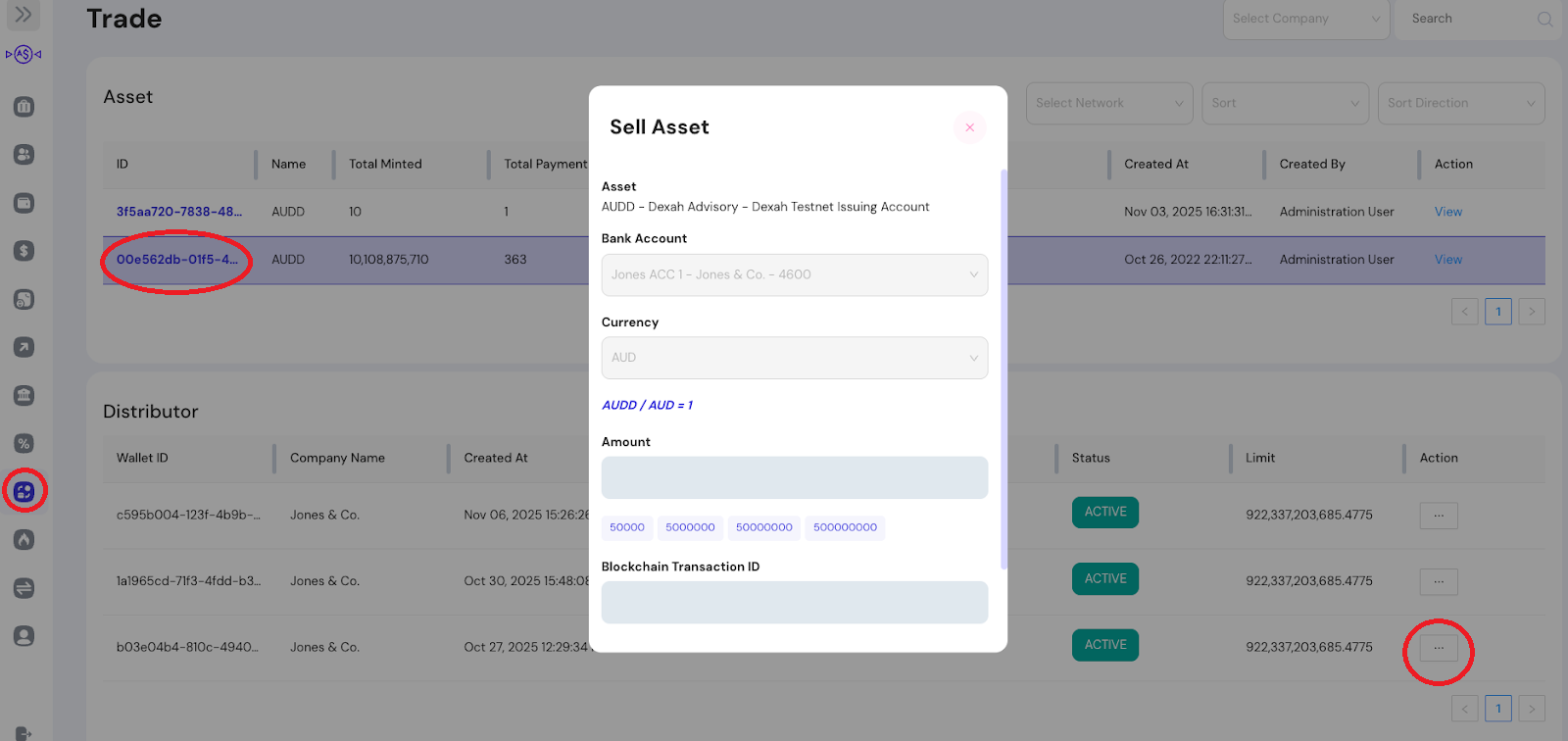
Fill the Sell Asset fields, following the guide below:
| Field | Required | Description |
|---|---|---|
| Bank Account | ✅ | The ID of the Virtual Account (VA) to receive the AUD into once the AUDD is burned. |
| Currency | ❌ | Pre-filled; only AUD currently supported |
| Amount | ✅ | The amount of AUDD to burn; this should be the same amount you sent on-chain |
| Blockchain Transaction ID | ✅ | The Transaction hash from your previously submitted transaction. |
Double check the information entered. If everything is ok, click the OK button at the bottom of the modal. This will close the modal, and initiate the Burning process.
✅ Burn Validation
Once you submit a burn request, the initial status will appear as PENDING or IN_PROGRESS. The time it takes to complete can vary depending on the blockchain you’ve selected - in some cases it’s just a few seconds, while on others it may take a few minutes. Factors like chain congestion and the number of confirmations required by the network will affect how quickly the request finalises.
Once the burn is successful, you can validate it by checking the balance of your selected VA. The balance should contain the AUD amount of the AUDD burnt.
Rounding and Decimals:AUD credited to your VA balance will be to 2 decimal places. Burning any values less than 1 cent will not be credited to your balance.
📺 Watch: Video Tutorial
Updated 10 months ago